
Use this article to add or remove participants in a Learning Experience in Beacon.
You must have a Facilitator profile and access to the Learning Experience you want to manage. Groups must exist before they can be added to a Learning Experience.
Jump To:
Add Participants
Participants can be added as individual Learners or as a group. Access the Manage Participants panel using any of the following:
- Select the edit icon
 under Participants on the left side of the Stream tab, or
 - Select Edit LX in the top right of the Learning Experience, or
- Select Edit icon on the from the main Learning Experiences page.
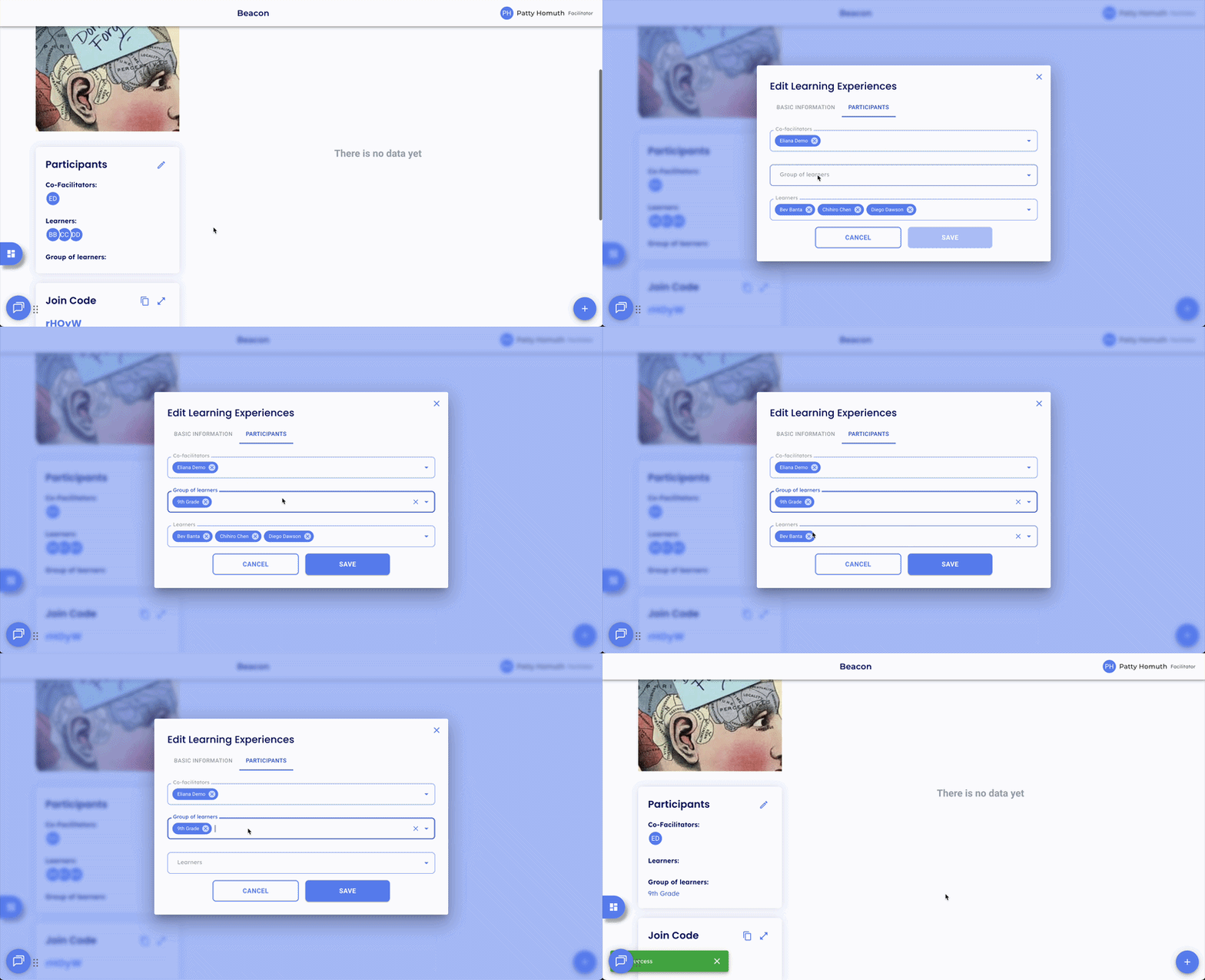
- On the Manage Participants tab, select the individual Learner(s) or group(s) you want to add.
- Select Save to confirm.
⭐ Adding a group will enroll all current members of that group in the Learning Experience. Any new additions to that group will be automatically reflected in the LX.
Note: If a Learner is added to a group after tasks have already been assigned, they will be added to the LX automatically, but existing tasks will need to be manually assigned to them.
Remove Participants
How you remove a participant depends on how they were originally added to the Learning Experience.
Added via your group: Navigate to My Groups, open the group that was used, and remove the Learner from the group.
Added individually: Open the LX, select Edit LX, and remove the Learner directly from the participants list.
Added via a Global Group: Global Groups are managed by your admin. The Learner cannot be removed from the LX unless your admin removes them from the Global Group.
Note: Removing a Learner from a Learning Experience does not delete their ratings, tasks, or progress data.
Co-Facilitators
Co-facilitators have the same access as the primary facilitator in a Learning Experience, with two exceptions:
- Task ratings: When a co-facilitator rates a task, the primary facilitator's name will appear under Progress when the rating is viewed.
- Copying an LX: When a co-facilitator copies a Learning Experience, the copy will be created under the primary facilitator's profile, not the co-facilitator's.
🤔 FAQs
Can I add a Learner to an LX without adding the whole group? Yes. When adding participants, search for and select the individual Learner rather than the group.
A Learner was added to my group after tasks were assigned, do I need to do anything? The Learner will be added to the LX automatically, but any tasks already assigned will need to be manually assigned to them. You can do this by selecting the task card for that Learner and assigning directly, or by editing the task and reassigning to all Learners.
I need to remove a Learner added via a Global Group, who do I contact? Global Groups are managed by your admin. Reach out to them to have the Learner removed from the group.